
OCR and text extraction
A scanned document is an image as far as a database is concerned. Text extraction turns it back into text, so that a repository of scans is searchable by what the documents say rather than only by what someone named them.
Two paths
Section titled “Two paths”Extraction picks the cheaper path that will work:
Text layer extraction. A PDF produced by exporting from an application already contains its text. That text is read directly - fast, exact, and with no recognition error.
Optical character recognition. An image, or a PDF that is a scan with no text layer, is rasterised page by page and passed through the OCR engine. Slower, and the result is a recognition rather than a transcription: quality depends on scan quality.
You do not choose between them. The document decides.
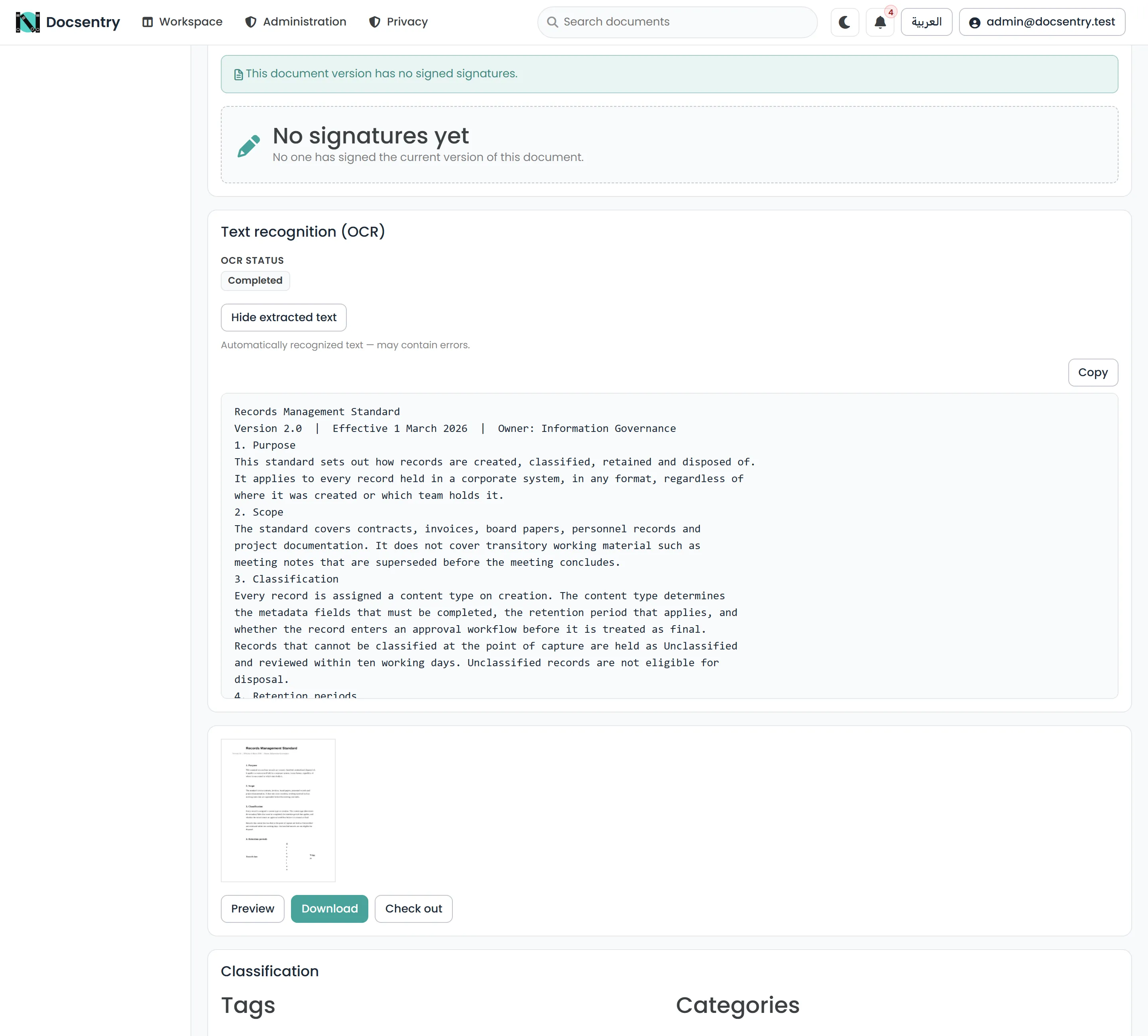
Extraction status and the recognized text sit together on the document, so a poor result is visible rather than silently indexed.
Configuration
Section titled “Configuration”| Setting | Purpose |
|---|---|
Ocr:Enabled |
Turns extraction on or off. |
Ocr:TesseractPath |
Path to the OCR engine executable. |
Ocr:TessdataPrefix |
Directory holding the trained language data. |
Ocr:Languages |
Trained models to load. eng+ara by default - English and Arabic together. |
Ocr:TimeoutSeconds |
Bound on one document, 120 seconds by default. |
Ocr:MaxImagePixels |
Cap on the raster size, per page. |
Ocr:ImageExtensions |
Which file extensions are treated as images. |
Languages accepts several models joined with +. Adding models improves recognition of those
scripts and costs time, so list the ones you actually have rather than everything available.
MaxImagePixels protects against a single enormous page consuming all available memory. It
applies per page, so a long document is not penalised for its length.
Where extracted text appears
Section titled “Where extracted text appears”- In search. Extracted text is indexed alongside names and metadata, so the document becomes findable by its contents. See Search.
- On the document. A text panel shows what was extracted, which is also the quickest way to judge whether recognition worked on a poor scan.
Extraction is per version. A new version gets its own extraction, and search reflects the new content once the job has run.
Reading the status
Section titled “Reading the status”Two failure-shaped states mean quite different things, and the distinction saves a lot of misdirected investigation:
| Status | Meaning | What to do |
|---|---|---|
| Pending | The job has not processed this version yet. | Wait for the next interval. Normal shortly after upload. |
| Failed | Extraction was attempted and did not succeed. | Usually the engine is unreachable or misconfigured - check TesseractPath and TessdataPrefix. Can also be a document that genuinely cannot be recognised. |
Pending is not an error. Extraction runs on a background job, so every newly uploaded document is pending for a while.
Failed usually means configuration, not content. If every document fails, the engine is not where the application thinks it is. If one document fails among many that succeeded, it is more likely that document.
When the engine is not installed
Section titled “When the engine is not installed”If no OCR engine is available, documents still upload, store, version, preview, and download normally. They remain findable by name, metadata, tags, and categories. Only their contents go unindexed.
That is a reasonable operating state for a repository of born-digital files whose PDFs already carry text layers. It is a poor one for a repository of scans, where the contents are the only thing that distinguishes one document from another.
See Installation for what to install.
Performance
Section titled “Performance”Recognition is the most CPU-intensive work the system does routinely. It is deliberately kept out of the request path and given a smaller batch size than most other jobs, so a backlog of scans degrades gracefully - extraction falls behind rather than starving the rest of the application.
A large import of scanned material will take a while to become fully searchable. That is expected; the work is bounded per interval on purpose. See Background jobs.
Related
Section titled “Related”- Search - what extracted text feeds.
- Previews - the other per-version rendering job.
- Uploading - where extraction sits in the pipeline.
- Troubleshooting - reading Pending against Failed.