
Email is configured under Governance > Email / SMTP Settings in the administration section, and by
the Email and EmailIntake configuration sections.
Outbound email
Section titled “Outbound email”| Setting | Default | Purpose |
|---|---|---|
Email:Enabled |
false |
Master switch. Off means nothing is sent. |
Email:Host |
- | SMTP host. |
Email:Port |
587 |
SMTP port. |
Email:UseStartTls |
true |
Upgrade the connection with STARTTLS. |
Email:Username |
- | SMTP username. |
Email:Password |
- | SMTP password. |
Email:ApiKey |
- | API key, where the provider uses one instead of a password. |
Email:FromAddress |
- | Sender address on outgoing mail. |
Email is disabled by default. In-app notifications still work; mail is held in the outbox, not failed, until email is configured.
Mail goes out only when all three are true: Email:Enabled is on, a Host and valid FromAddress
are set, and the administrator switch on the settings screen is on. The settings screen shows each
of these, and whether PublicSite:BaseUrl is set, so it always agrees with what the delivery job
will actually do.
| Setting | Default | Purpose |
|---|---|---|
PublicSite:BaseUrl |
- | The public address used to build links in email. Falls back to ContentIsolation:ApplicationOrigin. Without either, notification emails are sent without links. |
The settings screen includes a test send, which sends immediately and bypasses the outbox. Use
it before relying on delivery. Supply Email:Password from the environment (Email__Password) or
a secret store, not from appsettings.json.
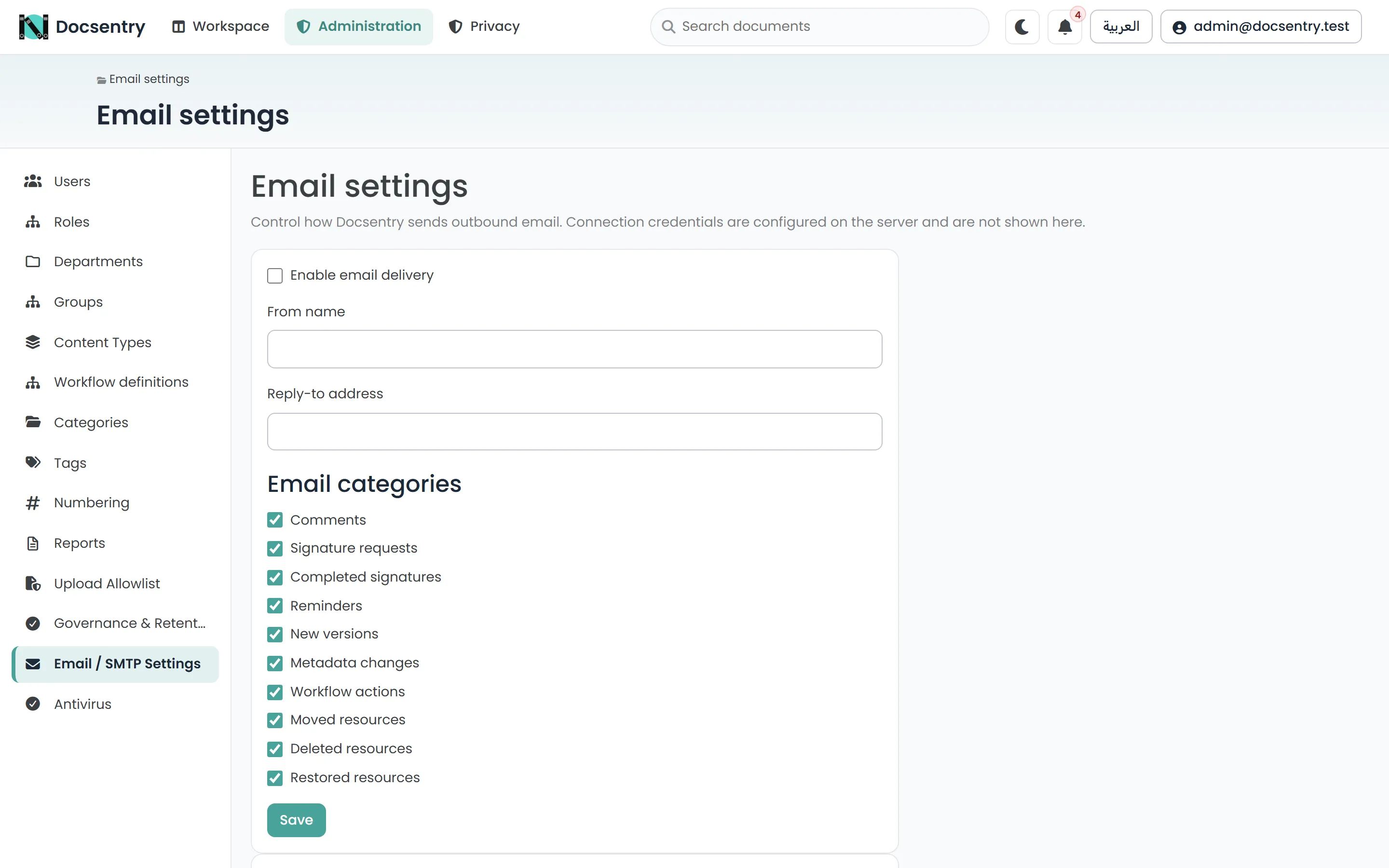
SMTP settings, with a test send. Use it before assuming delivery works.
The outbox
Section titled “The outbox”Mail is not sent during the request that triggers it. It is written to a durable outbox and delivered by a background job.
| Setting | Default | Purpose |
|---|---|---|
BackgroundJobs:EmailDelivery:Interval |
1 minute | How often the outbox is drained. |
BackgroundJobs:EmailDelivery:MaxItems |
100 | Messages per pass. |
BackgroundJobs:EmailDelivery:MaxAttempts |
3 | Attempts before a message is given up on. |
BackgroundJobs:EmailDelivery:BaseBackoff |
1 minute | Delay before a retry, growing with each attempt. |
BackgroundJobs:EmailDelivery:LeaseTimeout |
5 minutes | How long a claimed message stays claimed. |
BackgroundJobs:EmailDelivery:HoldingWindow |
3 days | Mail older than this when email becomes available is suppressed instead of sent. |
This design has three consequences worth knowing:
- A slow or unreachable mail server does not slow the application. The user’s action completes; delivery catches up.
- Transient failures resolve themselves. A mail server down for two minutes causes a retry, not a lost notification.
- The lease means a crashed delivery pass does not strand messages. A claim that is not completed within the lease timeout is reclaimed by the next pass.
- A configuration problem does not burn retries. If the server is unconfigured or rejects the credentials, the message goes back to pending without using an attempt.
- Switching email on late does not flood inboxes. Mail queued longer than the holding window is suppressed rather than delivered weeks after the event.
Each message ends in one of: sent, failed (after its retries), suppressed, or cancelled - the last when the recipient is erased before delivery.
Delivery is therefore near-real-time rather than instant. A notification arriving a minute after the event is working as designed.
Notification preferences
Section titled “Notification preferences”Each user controls which notifications reach them by email, from their own email preferences page. Every notification type is a category - workflow actions, signature requests and completions, reminders, comments, new versions, metadata changes, and documents moved, deleted or restored - and administrators can also switch a category off for everyone. Malware quarantine notices cannot be switched off by users.
People watching a document or folder are notified of changes to it, but never of their own actions.
In-app notifications are not affected by these preferences. Turning off an email category stops the mail, not the notification bell.
Sensible defaults matter here: notifications that are individually reasonable become noise in aggregate, and a user who mutes everything because the volume was intolerable will also miss the one that mattered.
Templates
Section titled “Templates”Mail is rendered from templates in both English and Arabic. A recipient receives mail - and sees in-app notifications - in their own language, taken from their profile rather than from the sender’s. The profile language is updated when the user signs in or switches language. Every notification email links to the document or folder it concerns.
Adding or changing a template means providing both languages. See Localization.
Inbound folder email intake
Section titled “Inbound folder email intake”Docsentry can also poll a mailbox and file incoming attachments into a folder.
| Setting | Default | Purpose |
|---|---|---|
EmailIntake:Enabled |
false |
Master switch. |
EmailIntake:Host |
- | IMAP host. |
EmailIntake:Port |
993 |
IMAP port. |
EmailIntake:UseSsl |
true |
Use SSL. |
EmailIntake:Username |
- | Mailbox username. |
EmailIntake:Password |
- | Mailbox password. |
EmailIntake:MailboxFolder |
INBOX |
Which mailbox folder to read. |
EmailIntake:BatchSize |
50 |
Messages per pass. |
Intake is disabled by default, and its background job is likewise disabled by default. Both must be turned on.
Related
Section titled “Related”- Users and roles - invitations depend on email.
- Collaboration - what generates notifications.
- Background jobs - the delivery and intake jobs.
- Localization - bilingual templates.