
Metadata and content types
Folders answer “where is it”. Metadata answers “what is it”, and it is what makes a repository searchable once it is too large to browse.
Docsentry offers four mechanisms, and they are not interchangeable.
Content types
Section titled “Content types”A content type describes a kind of document, and defines the fields that kind carries. An Invoice might have Supplier, Invoice Number, Amount, and Due Date; a Contract might have Counterparty, Effective Date, and Renewal Date.
Assigning a content type to a document is classification, and it determines which metadata fields that document can hold.
Field types available:
| Type | Holds |
|---|---|
| Text | Free text. |
| Number | A decimal value. |
| Integer | A whole number. |
| Date | A date. |
| Boolean | True or false. |
| Lookup | One value from a defined option list. |
| MultiSelect | Several values from a defined option list. |
Values are validated against the field’s type on save, so a Date field cannot end up holding “sometime in March”.
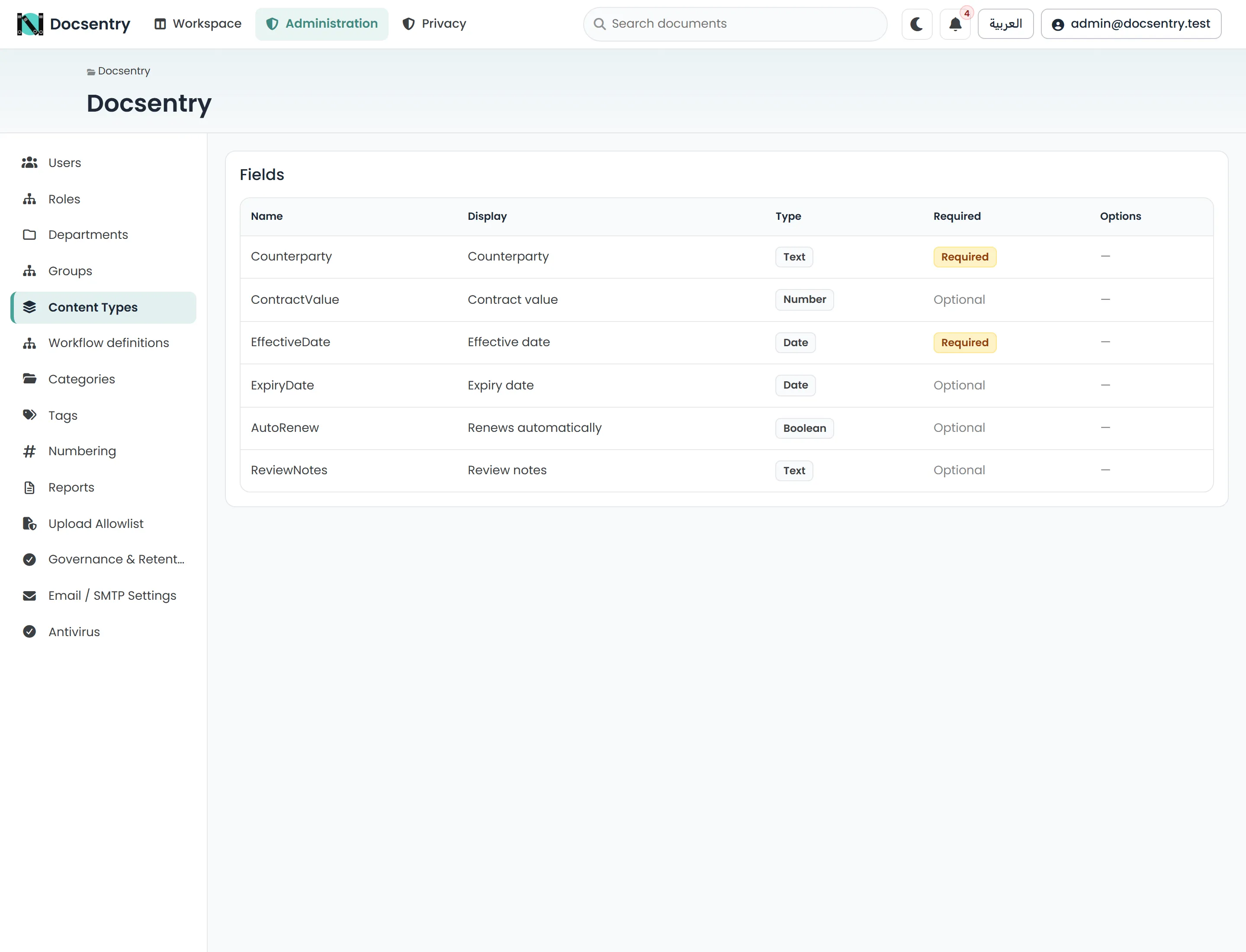
A content type’s fields are defined once, and every document of that kind then carries them.
Every document has a content type. Documents that have not been classified carry the built-in Unclassified type, which is seeded with the schema. A folder can specify a default content type so that uploads into it are classified without anyone choosing.
Content types are deactivated rather than deleted. Existing documents keep their classification and their field values; the type simply stops being offered for new documents. The same applies to individual fields.
Administrators manage these under Content Types - see Content types and taxonomy.
Tags are free-form labels. A document can carry many, they cross content-type boundaries, and
they are the right tool for a cross-cutting concern that does not belong to any one kind of
document - urgent, q3-audit, board-pack.
Tags are applied and removed by users with EditMetadata on the document. Administrators can
retire a tag, which stops it being offered without stripping it from documents that already have
it.
Categories
Section titled “Categories”Categories are a controlled vocabulary, defined by administrators rather than created ad hoc. Where tags are for whatever people find useful, categories are for the classification scheme the organisation has actually agreed on and wants to report against.
Like tags, a document can hold several. Like content types, categories are deactivated rather than deleted.
Document numbering
Section titled “Document numbering”A numbering scheme allocates identifiers - INV-2026-0042, CTR/26/0007. Allocation happens
server-side, so two people numbering documents at the same moment cannot receive the same
number.
A scheme has a pattern built from tokens:
| Token | Expands to |
|---|---|
{YYYY} |
Four-digit year. |
{YY} |
Two-digit year. |
{MM} |
Two-digit month. |
{SEQ} |
The allocated sequence value. |
{SEQ:0000} |
The sequence value, zero-padded to the given width. |
So INV-{YYYY}-{SEQ:0000} produces INV-2026-0042. The default pattern when none is given is
{SEQ:0000}.
If a pattern contains no sequence token at all, the allocated value is appended anyway, padded to four digits - a scheme cannot accidentally produce the same identifier twice.
Administrators define schemes under Numbering - see Numbering schemes.
Choosing between them
Section titled “Choosing between them”| You want to | Use |
|---|---|
| Define what fields a kind of document has | Content type |
| Record a value specific to one document | Metadata field |
| Label something loosely, across kinds | Tag |
| Classify against an agreed scheme | Category |
| Assign a formal identifier | Numbering scheme |
Metadata and search
Section titled “Metadata and search”All four feed advanced search as facets, which is the practical payoff: “contracts with counterparty X expiring this quarter” is a question the repository can answer only if that information was captured as typed metadata rather than left inside the file.
Related
Section titled “Related”- Content types and taxonomy - the administrative screens.
- Numbering schemes - defining and allocating.
- Search - how metadata is queried.